 AppSpend Sentinel
Know before an app charges you. Prove it when it shouldn't have.
AppSpend Sentinel reminds you before trials end and plans renew, reads your Shopify bills and app receipts into one ledger, flags charges you didn't agree to, and writes the refund request with your cancellation proof attached.
Free plan for 5 apps. Pro 9 USD every 30 days, billed by Shopify. No access to your orders or customers.

"I still don't know if it's cancelled properly."
Merchants say it in App Store reviews every month. You test an app, uninstall it, and the charges keep coming.
"Tried as 1 day not subscribed , still get charged"Shopify App Store review of a push app, Oct 2026
"I deinstalled the app wanting to stop it, and got an email that it will automatically bill me due to maxing the amount of subscribers… I still don't know if it's cancelled properly."Shopify App Store review of an email app, Oct 2026
"i have already uninstalled the app, it is still charging my company card for service fee"Shopify App Store review of an email app, Jun 2026
Why uninstalling is not enough
Usage lands on the next bill
Uninstalling stops future billing cycles, but usage and pending app charges can still appear on your next Shopify bill.
Source: Shopify Help Center, app charges
Some apps bill your card directly
Klaviyo and other email apps charge you outside Shopify. Removing the Shopify app doesn't cancel that plan: you cancel it in the vendor's billing page.
Source: Shopify Help Center, uninstalling apps; Klaviyo Community
Refunds go through the developer
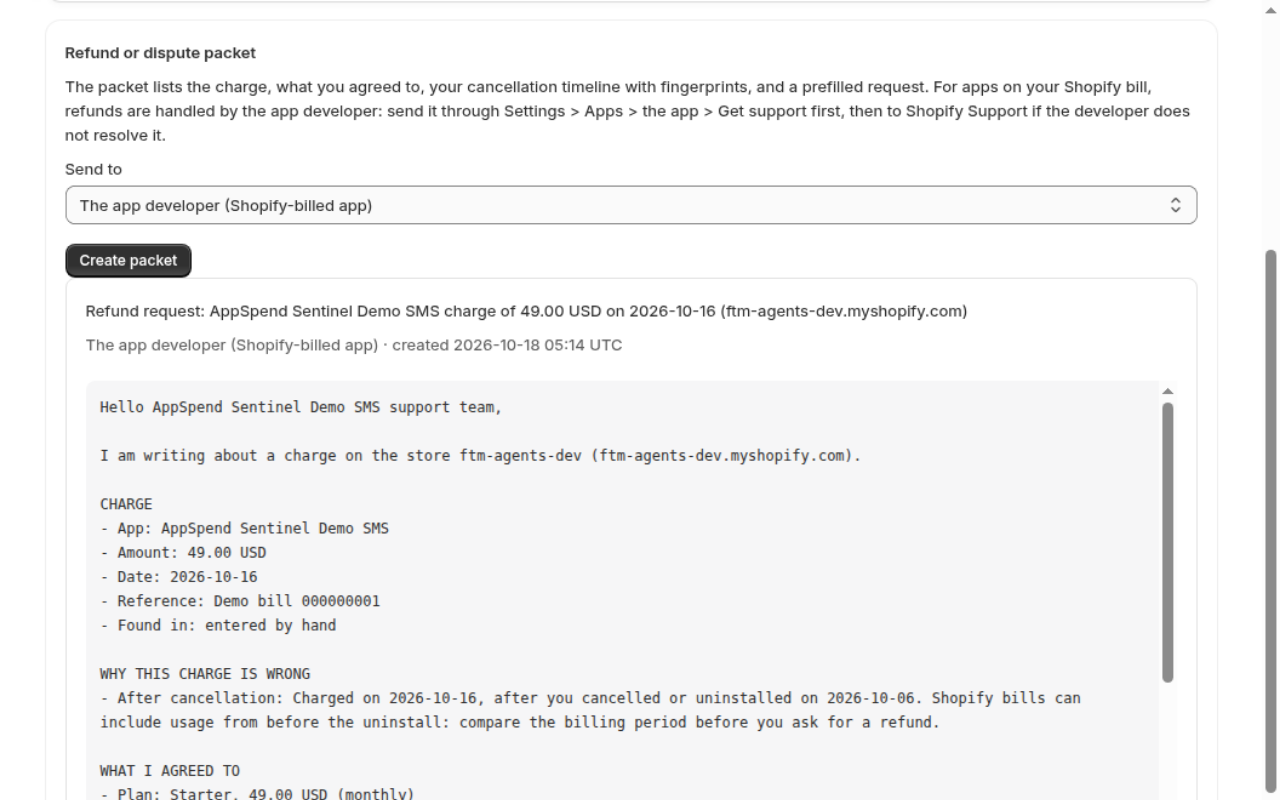
Shopify says refunds for app charges are handled by the app developer. You need dates, amounts, invoice numbers and screenshots to be taken seriously.
Source: Shopify Help Center, app charge refunds
How it works
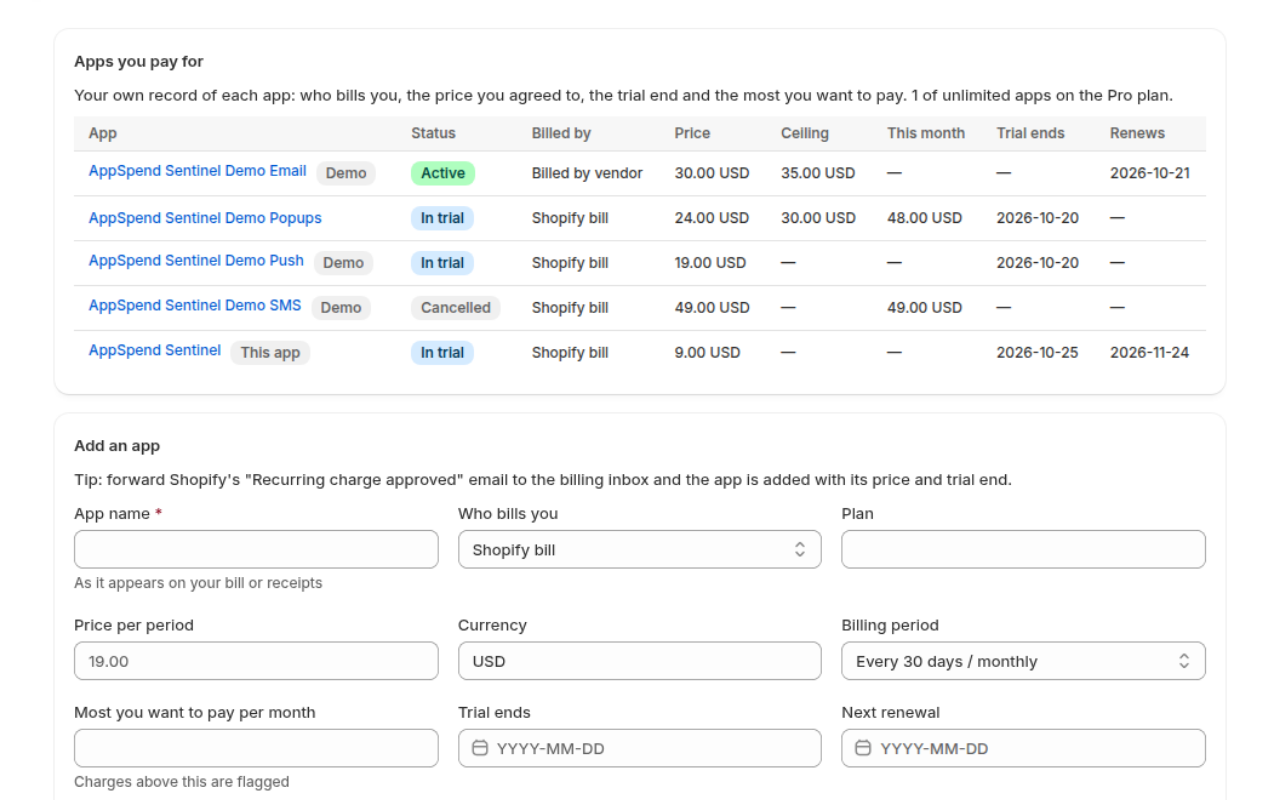
Register what you pay for
Add each app with its price, trial end, renewal and the most you'll pay per month. Forward Shopify's "Recurring charge approved" email and the app is added for you.
Send in your billing mail
Forward bills, receipts, trial and renewal notices to your private address, or paste them, upload .eml files or import the bill CSV from Settings > Billing.
Act before, prove after
Get an email 7, 3 and 1 days before a trial ends or a plan renews. When a charge doesn't match, open it and create the refund packet in one click.
What it checks on every charge
Each charge from a bill, receipt or CSV is compared with your register. Flags explain why, so a usage charge from before an uninstall is not mistaken for fraud.
- Charged after you cancelled or uninstalled
- Charged before the trial ended
- From an app that isn't in your register
- Above the plan price or your monthly ceiling
- Same amount twice within 5 days
- App spend over your monthly budget
- Renewal or usage notice after you cancelled
- Usage close to the plan limit (for example contacts)
Cancellation evidence
Log each step with its time, attach screenshots and confirmation emails. Every item gets a SHA-256 fingerprint.
Refund packet
The charge, what you agreed to, your timeline and a prefilled request for the developer, the vendor, Shopify Support or your bank, following Shopify's own checklist.
It watches itself too
AppSpend Sentinel lists its own subscription in your register, with its trial end, and reminds you before its own trial ends.
See the real app
Pricing
One avoided surprise charge pays for a year of Pro.
Free
- Up to 5 apps in the register
- Trial, renewal and usage reminders by email
- Paste, .eml upload and bill CSV import (20 per 30 days)
- Charge flags and monthly budget
- 1 refund packet per 30 days
Pro 7-day free trial
- Unlimited apps
- Private forwarding address
- 1,000 emails or files per 30 days
- Unlimited refund packets
- Screenshot and PDF evidence
Billed by Shopify on your Shopify bill. Switch to Free or uninstall at any time; the subscription ends at once.
Questions
Can it cancel or block another app's charges?
No, and no app can: Shopify gives one app no access to another app's billing. AppSpend Sentinel makes sure you act in time, shows where to cancel and gives you proof if a charge comes anyway.
Does it read my Shopify bill automatically?
Shopify has no API for that. You forward your bill emails (Pro), paste them or import the CSV that Shopify emails you from Settings > Billing > Past bills > Export bills.
What data does it access?
Only your store's name, email and currency. It asks for no access to orders, customers or products. It keeps what you send in, and deletes all of it 48 hours after you uninstall.
Which apps does it understand?
Any app: you name it in the register. Shopify bills and approval emails, receipts and common trial, renewal, usage and cancellation emails are recognised; anything else is kept so you can add the charge by hand.
Will it get my money back?
It can't promise that: the developer, vendor or Shopify decides. It gives you a complete, dated request so your case is easy to accept.
Try apps without the billing worry.
Reminders before the money moves. Proof after it moved.
Get early access